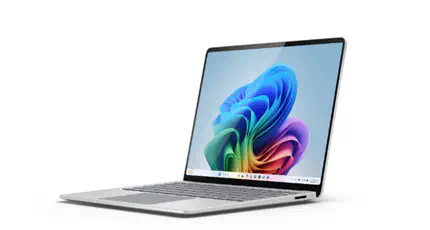
Surface Laptop for Business 7th Edition with Intel
My real-world daily-driver experience with Microsoft’s latest business-focused Surface Laptop
Introduction
For the last period, I have been using the Surface Laptop for Business 7th Edition with Intel as my daily driver. At the same time, I still use my Surface Laptop 13 very often, especially when I am on the road. That split happened naturally: the 7th Edition is my main productivity machine, while the Surface Laptop 13 is the one I grab first when mobility is the top priority.
This is not a benchmark-only review. It is a real-world perspective focused on meetings, writing, remote administration, browser-heavy workflows, and a desk setup with two 32-inch curved 4K monitors.
The short version: this is one of the most balanced business laptops Microsoft has shipped in the Surface line. It does not try to be flashy. Instead, it delivers reliable performance, excellent typing comfort, and a premium experience that stays consistent from early morning to late evening.
Design And Build Quality
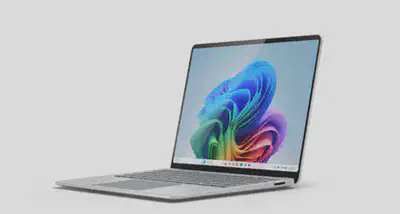
If you already know Surface hardware, the design language will feel familiar. The chassis is clean, professional, and minimal, which is exactly what I want in a business-focused machine. It looks at home in a boardroom, a home office, and a conference venue.
Build quality is one of the first things you notice when you use it daily. The hinge feels solid, the keyboard deck has minimal flex, and the device feels robust enough for regular travel. It has that typical Surface quality where it feels premium without becoming over-designed.
Compared with my Surface Laptop 13, this model feels more mature as a work tool. Not radically different, but more confident in how it handles long productivity sessions.
Daily Performance In Real Workloads
My typical day includes:
- 20 to 40 browser tabs
- Multiple Teams meetings
- Office apps and note taking
- PowerShell and management portals
- Light image editing
- Background sync tools and security agents
- Extended desktop use on two 32-inch curved 4K monitors
In this workload profile, the Intel configuration in the Surface Laptop for Business 7th Edition feels responsive and predictable. App launches are quick, switching between active windows is smooth, and the system remains stable under sustained multitasking.
Where this machine performs especially well is consistency. Many laptops can feel fast for short bursts. This one stays reliable over a full working day, even with heavy browser usage and communication apps running continuously, including when my dual 4K screens are connected.
I did not experience unexpected thermal spikes or distracting fan behavior during normal office tasks. Under heavier sustained load, cooling does become audible, but it remains controlled and never reached a point where it became disruptive during calls.
Keyboard, Trackpad, And Display Experience
For me, a daily-driver business laptop is only as good as its input experience. That is where this Surface really delivers.
Keyboard
The keyboard is excellent for long-form writing and documentation work. Key travel, key spacing, and tactile feedback are all in a very comfortable zone. I can type for hours without fatigue, and accuracy is consistently high.
Trackpad
The trackpad is precise, smooth, and dependable. Gestures are interpreted correctly, and palm rejection behaves well. I still prefer an external mouse for some tasks, but when I am mobile, the trackpad is fully reliable.
Display
The display is sharp and comfortable for all-day use. Text rendering is crisp, color reproduction is strong enough for day-to-day content work, and brightness has been sufficient in office and travel scenarios. The screen ratio remains one of the practical strengths of Surface laptops, especially for reading and writing.
Compared with my Surface Laptop 13, this model feels better suited to my desk workflow. I often run two 32-inch curved 4K monitors in my home office, and the overall experience remains smooth and productive.
Battery And Mobility
Battery life always depends on workload, brightness, connectivity, and conferencing hours. In my usage pattern, I can get through a normal business day with sensible power settings and realistic expectations. Heavy Teams usage and sustained high brightness will naturally reduce runtime, but that is true for almost every productivity laptop.
What matters most to me is confidence away from a charger. For mixed productivity work, this device has delivered that confidence. Standby behavior has also been dependable, with predictable resume performance when moving between locations.
In terms of mobility, the weight and form factor strike a good balance. It is portable enough for regular commuting and events, yet sturdy enough to feel like a serious work machine rather than an ultra-light compromise.
This is also where my Surface Laptop 13 still has a clear role in my workflow. When I know I will be moving a lot during the day, I tend to pick the Surface Laptop 13 first. When I expect heavier multitasking, longer writing sessions, and a full business workload, I choose the Surface Laptop for Business 7th Edition.
Ports, Connectivity, And Business Practicality
Business users care about friction. Can you connect quickly? Can you join meetings without drama? Can you work anywhere without carrying too many adapters?
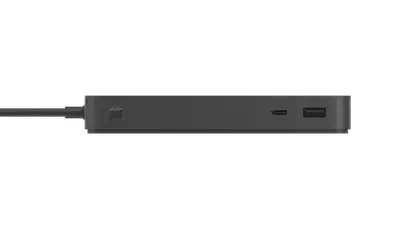
In my daily usage, connectivity has been stable and practical. Wireless performance has been strong, Bluetooth accessories pair reliably, and docking behavior has been straightforward. In my home office, I use the Microsoft Surface Thunderbolt 4 Dock, and that setup has been dependable day to day with my dual 32-inch curved 4K monitors.
Security and management are also part of the business story. The platform aligns well with modern Windows enterprise workflows, and that makes it easy to recommend in environments where device management, identity, and compliance matter.
Specifications At A Glance
The exact configuration can differ by market and purchase option, but this table reflects the type of setup I use and evaluate as a business daily driver.
| Component | Practical Business View |
|---|---|
| Processor | Intel Core Ultra (business-oriented configuration) |
| Memory | 16GB or 32GB recommended for multitasking-heavy users |
| Storage | Fast SSD options; 512GB is a practical baseline for most professionals |
| Display | High-resolution PixelSense display, productivity-friendly aspect ratio |
| External Display Workflow | Stable daily use with two 32-inch curved 4K monitors |
| Docking Setup | Microsoft Surface Thunderbolt 4 Dock in my home office |
| Battery | Full workday potential with mixed office workloads |
| Ports | Modern connectivity with docking-friendly workflow |
| Weight | Portable enough for daily commuting and travel |
| OS & Security | Windows 11 Pro readiness and enterprise management fit |
Pros And Cons
Pros
- Excellent keyboard for heavy daily typing
- Stable and consistent performance for real business workloads
- Reliable with a dual 32-inch curved 4K desktop setup
- Smooth docking experience with the Surface Thunderbolt 4 Dock
- Premium build quality with professional design
- Strong overall mobility and dependable battery behavior
- Smooth integration into modern Windows business environments
Cons
- Premium device means premium pricing
- Intensive video call days can reduce battery headroom faster
- Some users may still want an adapter depending on their accessory mix
- If your needs are very light, the full business configuration may be more than required
Final Verdict
The Surface Laptop for Business 7th Edition with Intel has earned its place as my main daily-driver device. It feels fast where it needs to be fast, comfortable where it needs to be comfortable, and reliable where business users need reliability most.
Because I also work with a Surface Laptop 13, I can say this confidently: the Surface Laptop for Business 7th Edition with Intel is my choice when the day involves sustained multitasking, long typing sessions, and frequent meetings. The Surface Laptop 13 remains my preferred companion when I am mostly on the move.
If you want a business laptop that prioritizes consistency, comfort, and practical productivity over unnecessary gimmicks, this one deserves a serious look.